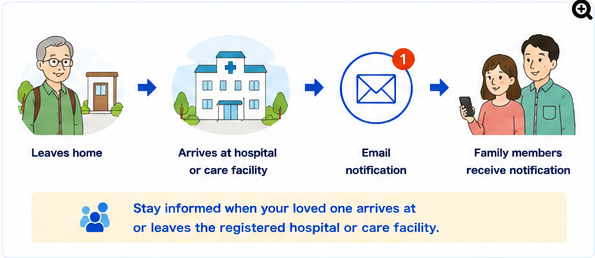
Worried whether they arrived safely
You want to know whether a family member traveling alone reached the hospital, clinic, or care facility as planned.
WatchAcross Email lets you register hospitals, clinics, care facilities, rehabilitation centers, or day-service locations as monitored areas. It can send an email when the monitored device enters or leaves one of those areas.
This use case is suitable for families who want to confirm arrival and departure on appointment or care-service days without continuously viewing the person's location.
You want to know whether a family member traveling alone reached the hospital, clinic, or care facility as planned.
You would like to know when a day-service or rehabilitation visit has ended so you can prepare for pickup or their return home.
Family members and other involved people should be able to review arrival and departure information through ordinary email.
You do not need continuous tracking. You only want to know when the person enters or leaves the registered facility area.
The following flow uses a hospital or care facility as the registered area and inside-area detection.
Create a circular area around the hospital, clinic, care facility, rehabilitation center, or day-service location.
Start manually, or use the Auto-start Timer to begin at a scheduled time on the appointment or service day.
When the device is detected inside the registered area, an email is sent to the configured address.
The Google Maps link in the notification can be used to review the detected location.
When the device is detected outside the registered area, an email is sent to indicate departure.
Forwarding or a shared inbox can help multiple family members and involved people review the same notifications.
These are examples only. Adjust the configuration for the size of the grounds, nearby buildings, local conditions, and GPS accuracy.
| Data Set Name | Use a clear name such as “Hospital Visit,” “Day Service,” or the facility name |
|---|---|
| Registered Area | A circular area centered on the hospital or care facility |
| Area Diameter | Start with approximately 150 to 300 meters and adjust for the size of the grounds and false detections |
| Detection Mode | “Detect when inside the area” to receive an arrival notification and another notification when the device leaves |
| Auto-start Timer | Set a time before departure on the appointment or service day, for example 7:30 AM |
| Notification Address | An email address that family members or caregivers can check consistently |
| Repeated Notifications | Use as needed. Availability and limits differ between the free and subscription versions |
Monitoring can begin automatically at a scheduled time on the appointment or service day. This helps reduce forgotten starts and makes the app easier to use when family members live separately.
* Auto-start may not work if the app has been force-quit.
Save separate area information and monitoring settings for hospitals, day-service centers, rehabilitation facilities, clinics, or care facilities, then switch according to the destination.
Receive an email when the device enters or leaves the registered facility area.
Because notifications are sent by email, family members can check them from home, work, or while away.
Notifications can be reviewed on smartphones, PCs, or tablets in a normal email environment.
The Google Maps link in the email can be used to review the detected location.
Hospital, clinic, day-service, rehabilitation, and care-facility settings can be managed separately as Data Sets.
The app checks the relationship between the device and registered areas and sends notifications when configured changes occur.
This app supports everyday family monitoring. It is not intended for patient management, attendance management, access control, or operational use by medical or care providers.
The app does not guarantee personal safety, emergency response, detection, or delivery of every notification. In an emergency, use appropriate telephone, medical, care, or local emergency services.
Explain the purpose and notification behavior to the person being monitored and use the app after the family has reached an agreement.
Before regular use, test arrival and departure notifications and confirm that the area size and email address are appropriate.
No. The app is installed and configured on the monitored person's device, while family members receive notification emails. The facility does not need to install a dedicated app.
It may work when the device can use location services and network communication, but GPS accuracy can be lower indoors. Also confirm the facility's rules and the person's consent.
Yes. Up to 24 areas can be registered in each Data Set, and separate Data Sets can be created for different purposes.
Yes. With inside-area detection, the app can notify you when the device enters the registered area and again when it leaves.
No. The app determines whether the device is inside or outside registered areas and sends email when a configured condition is met. It is not designed for continuous real-time tracking.
Location information is used for area detection and notification and is not stored externally or provided to third parties. See the Privacy Policy for details.
The free version has monthly notification and repeated-notification limits. Check the App Store for current pricing and conditions.
Before regular use, verify both arrival and departure notifications at the actual facility.