Worry about a parent living alone
You want to know whether your parent went out as usual and returned home safely, without calling repeatedly throughout the day.
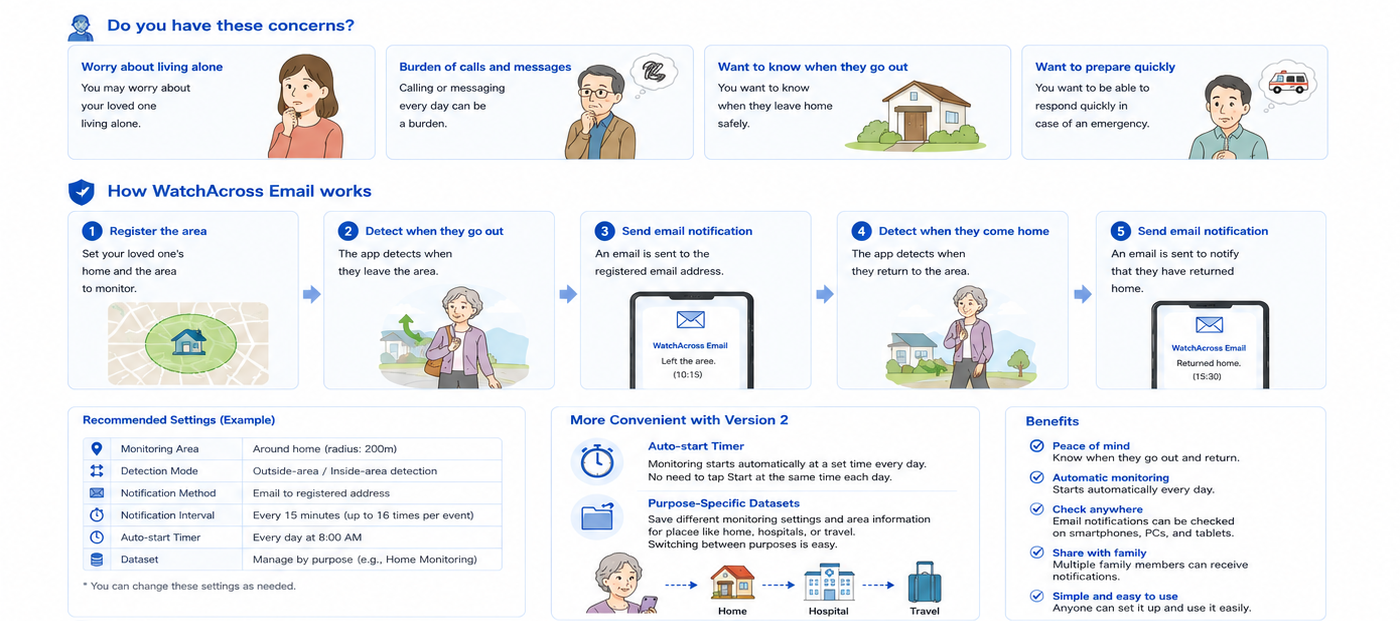
WatchAcross Email uses GPS to determine whether a device is inside or outside a registered area, then sends an email when a meaningful change such as leaving home or returning home is detected.
It is designed for gentle, everyday family monitoring rather than constant location viewing, making it suitable for families who want reassurance without excessive intrusion.
You want to know whether your parent went out as usual and returned home safely, without calling repeatedly throughout the day.
Frequent calls can become tiring for both sides. You would prefer to receive information only when a meaningful change occurs.
You would like an email when your parent leaves the home area for shopping, walking, appointments, or other daily activities, and another when they return.
You do not want one person to carry the entire responsibility. Family members or caregivers should be able to check the same information through ordinary email.
The following example uses the parent's home as the registered area and the outside-area detection mode.
Create a circular monitoring area around the home, allowing for the local environment and typical GPS accuracy.
Start manually or use the Automatic Start Timer to begin monitoring at the same time each day.
When the device is detected outside the registered area, an email is sent to the configured address.
The email includes a Google Maps link that helps the recipient review the detected location.
When the device is detected inside the registered area again, a return notification is sent.
Family members can use forwarding or a shared email environment to review the same notifications.
These values are examples only. Adjust them based on the building, local environment, GPS accuracy, and the person's normal range of movement.
| Data Set Name | Use a name that family members can recognize easily, such as “Parents' Home” or “Home Monitoring.” |
|---|---|
| Registered Area | A circular area centered on the parent's home |
| Area Diameter | Start with approximately 200 to 500 meters, then adjust if false detections occur |
| Detection Mode | “Detect when outside the area” to receive an outing notification and another notification when the device returns inside |
| Automatic Start Timer | Set a time before the person's day normally begins, for example 8:00 AM |
| Notification Address | An email address that family members can check consistently |
| Repeated Notifications | Use as needed. Availability and limits differ between the free and subscription versions |
Monitoring can begin automatically at the same time each day, reducing the need for the elderly parent to tap the Start button every morning.
* Automatic start may not work if the app has been force-quit.
Family members who live elsewhere cannot operate the monitored device every morning. The Automatic Start Timer makes long-term daily use more practical.
Area information and monitoring settings can be managed in up to five Data Sets, with up to 24 areas in each set.
A daily setup for checking outings and returns around the home.
A separate setup for confirming arrival at a hospital, clinic, or care facility.
A temporary setup for a hotel, relative's home, or other destination.
Get email notifications when the device moves outside or returns inside a registered area.
Because alerts are sent by email, they can be reviewed on smartphones, PCs, and tablets.
Family members do not need a separate viewer app. Standard email can be used for sharing and checking notifications.
The Automatic Start Timer can begin monitoring at a scheduled time every day.
Stored configurations can be recalled for home, hospitals, care facilities, or travel.
Location information is used for area determination and notification. See the Privacy Policy for details.
The app is intended to support everyday family monitoring. It does not guarantee personal safety, emergency response, detection, or delivery of every notification.
Detection or notification may not work because of poor connectivity, battery depletion, location settings, background restrictions, or force-quitting the app.
Explain the purpose and type of notifications to the person being monitored and use the app only after family members have reached an agreement.
Before regular use, test both outing and return notifications and confirm that the area size and email address are appropriate.
Initial setup and occasional checks are still required, but enabling the Automatic Start Timer can reduce daily Start operations. Automatic start may not work if the app has been force-quit.
The app must be installed on the monitored device. Family members who receive notifications generally only need an email environment.
No. The app is not designed for continuous real-time location viewing. It determines whether the device is inside or outside registered areas and sends email when the configured condition is met.
Location information is used for area detection and notification and is not stored externally or provided to third parties. See the Privacy Policy for details.
Yes. GPS accuracy may vary indoors and depending on the surrounding environment. Set a slightly larger area and adjust it after testing in the actual location.
No. This is not an emergency notification service. In an emergency, use telephone services, local emergency numbers, medical services, or appropriate caregiving support.
The free version has monthly notification and repeated-notification limits. Check the App Store for current pricing and conditions.
Before regular use, verify area registration, outing alerts, and return alerts in the actual environment.