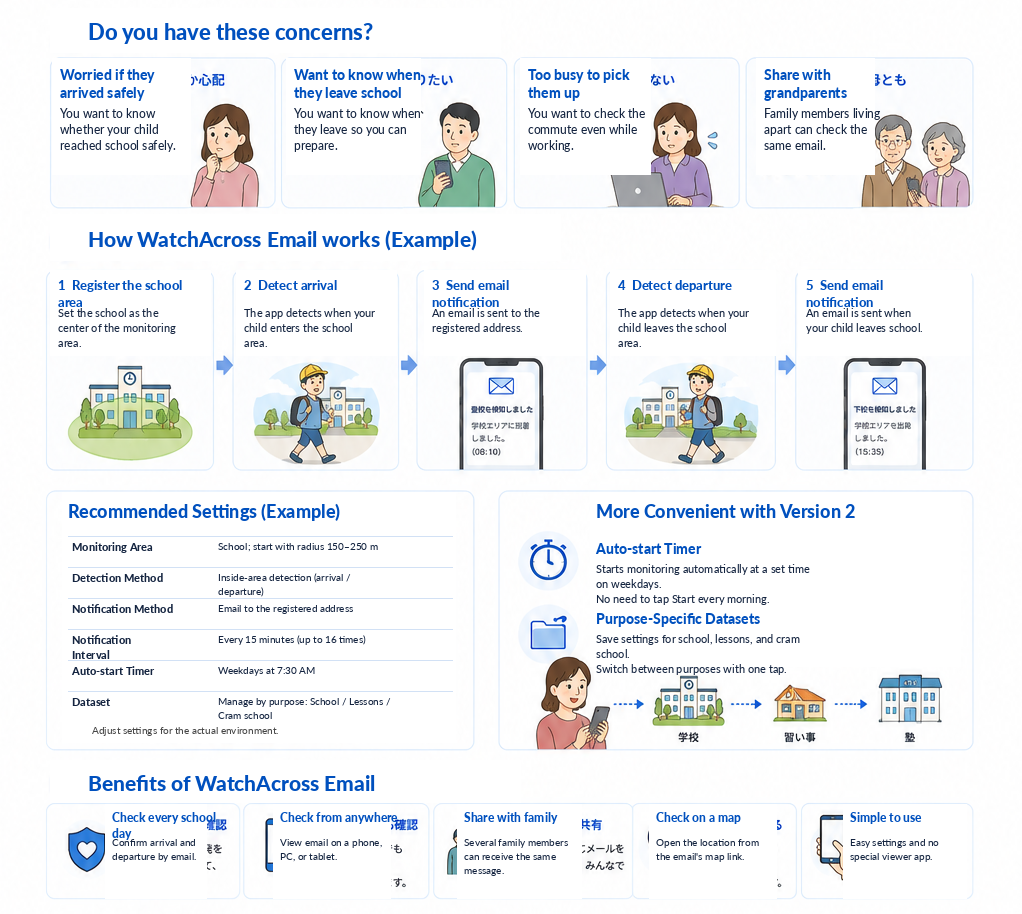
Worried whether your child arrived safely
You want to confirm from a distance that your child arrived at school safely.
WatchAcross Email uses GPS to determine whether the monitored device is inside or outside registered areas such as school or home, and sends email notifications when the status changes.
Rather than continuously displaying the device location, it is designed to notify you when meaningful events occur, such as arriving at or leaving school.
You want to confirm from a distance that your child arrived at school safely.
Dismissal time may vary, so you want to know when your child leaves school to prepare for pickup or their return home.
You want to check the school commute by email even while working or away from home.
You want parents, grandparents, and other family members to check the same information in their usual email environment.
This is a typical flow when the school is registered as an area and inside-area detection is used.
Register a circular area centered on the school, taking nearby conditions and GPS accuracy into account.
Start manually, or use the Auto-start Timer to begin at a scheduled time on weekdays.
When the device is detected inside the registered school area, an email is sent to the configured address.
Use the Google Maps link in the notification email to check the detected location.
When the device is detected outside the registered school area, an email is sent to indicate departure.
Parents, grandparents, and other family members can check the notifications through forwarding or a shared inbox.
The following is an example. Adjust the settings for the school grounds, nearby environment, GPS accuracy, and commute route.
| Dataset name | 例:「Schoolの見守り」「小School」など、通知を見た家族が識別しやすい名称 |
|---|---|
| Registered area | Schoolを中心とした円形エリア |
| Area diameter | まずは150~250m程度を目安に試し、校舎の広さや誤判定に応じて調整 |
| Detection mode | 「エリア内を検知します」:Schoolへ入った時に通知し、Schoolエリアから出た時にも復帰通知 |
| Auto-start Timer | 登校前の時刻(例:平日7:30)に設定 |
| Notification address | 保護者や家族が継続的に確認できるメールアドレス |
| Repeated notifications | 必要性に応じて利用。無料版とサブスクリプション版では利用条件が異なります |
毎日決まった時刻にStart monitoring before schoolできます。親御さんがその都度「開始」ボタンを操作する必要を減らせます。
Note: Auto-start may not work if the app has been force-quit.
仕事や家事で朝が忙しい家庭でも、Auto-start Timerを利用することで登下校の見守りを続けやすくします。
You can manage up to five datasets, each with up to 24 registered areas and its own monitoring settings.
Schoolへの到着・出発を確認する日常用の設定。
Lessonsの教室やスポーツ施設への到着・出発を確認する設定。
Cram schoolへの到着・出発を確認するための設定。
Schoolへの到着やSchoolからの出発など、Registered areaとの関係が変化した時に通知を受け取れます。
通知はメールなので、PCやタブレットなど普段のメール環境でも確認できます。
専用の閲覧アプリを家族全員が導入しなくても、メールを使って情報共有できます。
Auto-start Timerにより、登校前の決まった時刻に見守りを始められます。
School、Lessons、Cram school、自宅など、利用場面に合わせて保存済み設定を呼び出せます。
位置情報はエリア判定と通知のために使用されます。詳しくはプライバシーポリシーをご確認ください。
This app is intended to support everyday family monitoring. It does not guarantee personal safety or notification delivery.
Detection or notification may fail because of no network coverage, low battery, location settings, background restrictions, or force-quitting the app.
Explain the purpose and notification behavior clearly to your child and use the app with family agreement.
本格利用の前に、外出・帰宅のテストを行い、Area diameterやNotification addressが適切か確認してください。
初期設定や必要な確認は必要ですが、Auto-start Timerを有効にすると、毎日の開始操作を減らせます。ただし、アプリを強制終了すると自動開始が動作しない場合があります。
見守り対象のお子さまの端末にはアプリが必要です。通知を確認する保護者側は、通常のメールを受信できる環境があれば確認できます。
本アプリは位置を常時閲覧するためのサービスではありません。Registered areaとの関係を判定し、条件に該当した時にメール通知します。
位置情報はエリア判定と通知に使用され、外部への保存や第三者提供は行いません。詳細はプライバシーポリシーをご確認ください。
建物内や周囲の環境によってGPS誤差が発生する場合があります。Area diameterを少し大きめに設定し、実際の環境で調整してください。
Lessons、Cram school、自宅なども登録できます。目的ごとにデータセットを分けると切り替えやすくなります。
無料版には月間通知回数やRepeated notificationsの制限があります。最新の料金と利用条件はApp Storeでご確認ください。
まずは実際の通学環境で、Schoolエリアへの到着通知と出発通知の動作を確認してください。